The AI file is Adobe Illustrator's native vector format: it describes a logo as curves that can be redrawn at any size, which makes it the favorite file of textile workshops. Failing that, an EPS, SVG or vector PDF works, and a large PNG can fill in.
"Could you send us the logo in vector format?" If that message from the workshop had you opening three folders and an old email without finding anything but a PNG, breathe: you are in the most common situation of a first project, workshops know it, and there is a solution for every case. This guide explains what is actually being asked of you, what the files you already have are worth, and what to do if the right one is missing.
What the workshop expects, and why
Let's lift the mystery first. Your logo exists as two species of files, and the whole conversation with the workshop comes down to this difference.
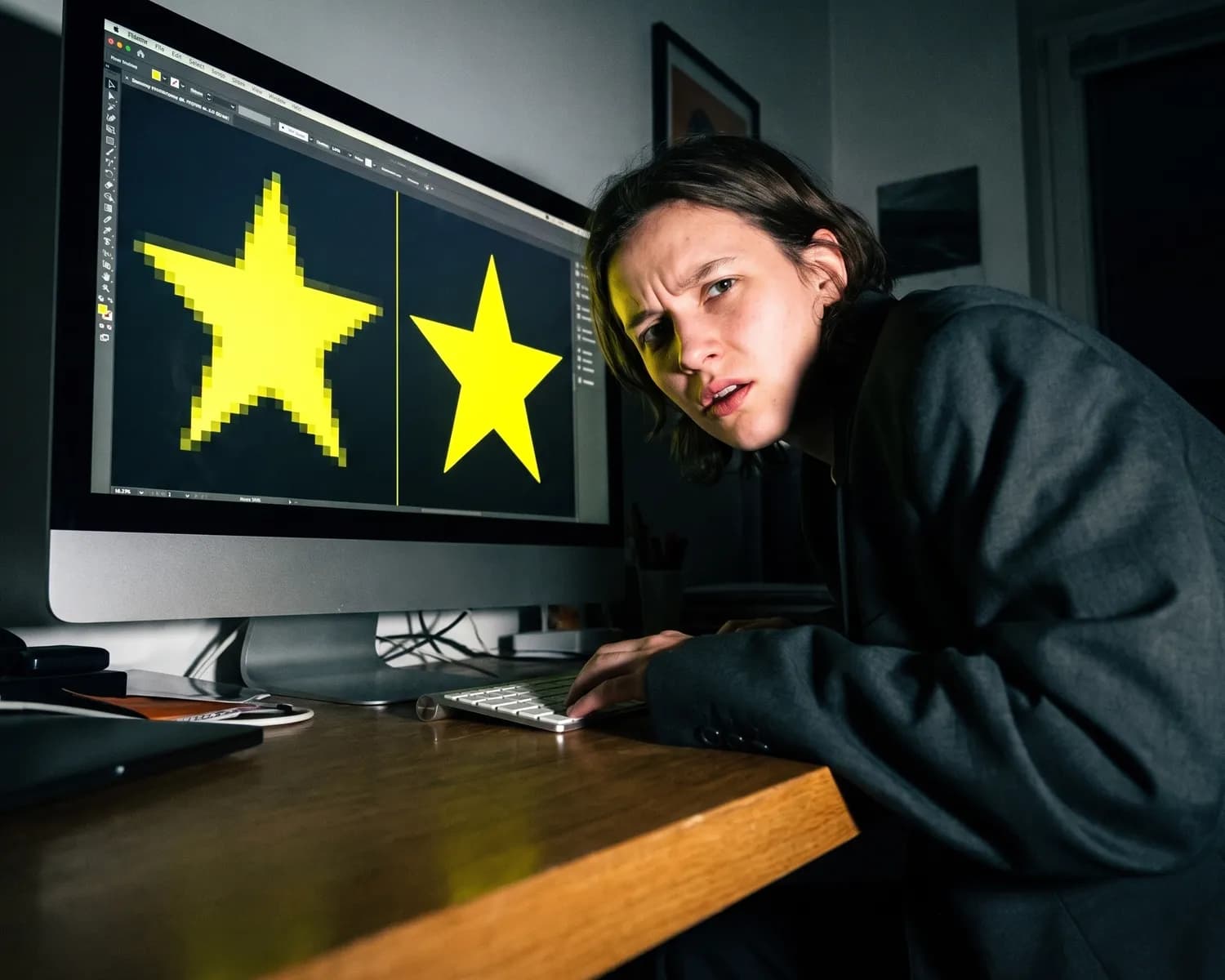
The pixel file (PNG, JPEG, WebP) is a grid of small colored squares: a photo of your logo, in essence. At its original size, all is well. Enlarged on the back of a t-shirt or a banner, each square grows and the outlines turn into staircases.
The vector file (AI, EPS, SVG, some PDFs) stores shapes rather than squares: mathematical curves that redraw perfectly at any size. It is your logo's construction plan, where the PNG is only its photo. A plan can be enlarged infinitely; a photo cannot.
That is why the workshop asks for vector: they may print your logo at 8 cm on a chest AND 30 cm on a back, cut its outlines for a transfer, or embroider it stitch by stitch. All those machines work from shapes, not squares. It is not designer fussiness: it is what guarantees your logo comes out sharp.
The file hierarchy, from best to worst
Take stock of what you have, in this order.
1. The AI file. The original from Adobe Illustrator, the software most logos are born in. It is the source file par excellence: if you have it, send it as is, the workshop has what it takes to open it (you do not need Illustrator to forward it, or even to check it: free online viewers display it).
2. EPS, SVG, or vector PDF. The other shape formats: just as good for the workshop. Beware of the PDF trap: a PDF can contain vector artwork or just a pixel image saved as PDF. The quick test: zoom all the way in; if the outlines stay sharp, that is a good sign.
3. The large PNG on a transparent background. Not ideal, but often workable: a PNG of 2000 pixels or more, on a transparent background, is enough for many standard-size markings. It is the best of the pixel files.
4. The JPEG. White background imposed (JPEG does not know transparency), compression that damages outlines: it helps to show the logo, rarely to produce it.
5. The screenshot, the logo scraped from the website, the scanned business card. Too small, too damaged: they serve as visual reference, not as production files. If that is all you have, go straight to plan B.
All you have is a PNG? The plan B, in order
It is the case for most first projects, and it almost always gets solved. Three leads, from best to last.
Lead 1: find the source file. Your logo was drawn by someone: the designer from five years ago, the website agency, the talented cousin. That person has the vector original, and you are entitled to ask for it (it is your logo). One email is often enough to recover the treasure. Take the opportunity to archive it properly this time: your logo's source file should live with you, not only with its creator.
Lead 2: vectorize the PNG. Tools now do this job in seconds: Depixelise, for example, is free and requires no signup: you drop your PNG, it emails you back the vectorized SVG with the variations a workshop asks for (transparent background, monochrome version, negative version). For a logo with clean shapes, the result is generally faithful; check it by zooming before sending. A very complex logo (gradients, photos, fine details) vectorizes less well automatically: that is the honest limit of the exercise.
Lead 3: ask the workshop. Some workshops offer to redraw your logo in vector, as an add-on to the quote. It is manual designer work: it costs, but you walk away with a clean source file for all your future orders. Ask at quote time, or use the directory to spot a workshop near you to ask.
The checklist before sending
Right file in hand, five one-minute checks:
- The format: vector preferably, otherwise your best large PNG with a transparent background.
- The background: transparent, unless your logo deliberately contains one. A white rectangle around the logo on a dark t-shirt is the classic of classics.
- The colors: if your brand requires exact colors, give the workshop their references (the Pantone name or the hex code) rather than "the same blue as the file".
- The variants: send what you have (light version, dark version, monochrome) and let the workshop pick the right one for each garment.
- One clean delivery: a folder with clear file names beats four successive emails. The workshop will thank you, and your proof will arrive faster.
File sent, the rest of the journey is mapped: the workshop prepares its mockup, and you will receive a proof to approve before printing: it is what confirms your logo is sharp, at the right size, in the right place. And if you are discovering the whole journey of a first order, our guide to getting t-shirts printed walks through it step by step: the logo file is its starting point.
FAQ
Frequently asked questions
I only have my logo as a JPEG, is that bad?
No, it is the most common case on a first project. In order: recover the source file from the logo's creator, otherwise vectorize the JPEG with a free tool, otherwise ask the workshop for vectorization at quote time. A large, clean JPEG remains a good working base.
What is a vector file?
A file that describes your logo as shapes and mathematical curves rather than pixels: it redraws perfectly at any size. The common formats are AI, EPS, SVG and some PDFs. It is the logo's construction plan, where a PNG is only its photo.
How do I open an AI file without Illustrator?
To check its contents, free online viewers display AI files without any software. But for your order, you do not need to open it: forward it as is to the workshop, they have the tools to work with it.
How large should a PNG be to print a logo?
As large as possible, on a transparent background: from 2000 pixels wide, many standard-size markings print fine. Below that, ask the workshop's advice before ordering, or go through vectorization.
Can a PNG be turned into a vector file?
Yes: free tools like Depixelise automatically retrace the outlines into curves, with good results on logos with clean shapes. Very complex logos (gradients, photos, fine details) call for a manual redraw by a designer or the workshop.
Over to the workshop
You know what you need. Find the workshop that makes it.
The directory lists workshops city by city, with their techniques and direct contact. A fast quote answers you within 24 hours.